
Google Forms works well for managing employee travel requests because it gives companies a simple way to collect trip details, organize approvals, and track upcoming business travel in one shared workspace. Teams can submit requests from any device while managers review destinations, travel dates, transportation needs, accommodation plans, and estimated expenses before bookings are finalized.
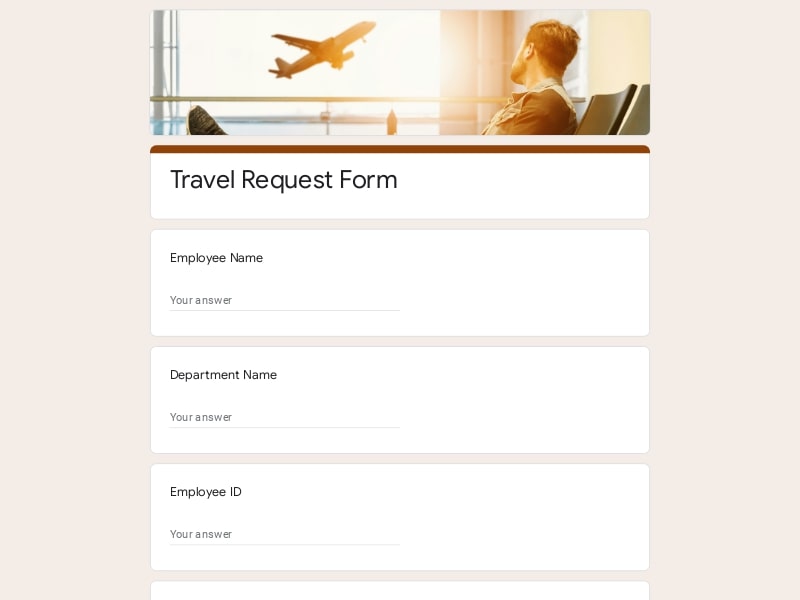
This Travel Request Form template for Google Forms provides a clear workflow for submitting and reviewing employee travel requests. Teams can document destinations, travel dates, transportation needs, accommodation requests, business purpose, estimated expenses, and approval requirements in one centralized form that supports travel coordination, budgeting, and reimbursement preparation.
A travel request form is a structured document used by organizations to collect and review employee travel details before any business trip is approved or booked. It standardizes how employees submit information such as destination, travel dates, purpose of the trip, transportation method, and estimated expenses, allowing managers or HR teams to evaluate and authorize travel in a controlled and consistent way.
In Google Forms, a travel request form becomes a digital workflow that centralizes approval decisions, improves visibility over travel-related costs, and creates a clear record for compliance and reimbursement. It ensures that all business travel follows internal policies and that every request is reviewed with the same set of operational criteria.
A well-structured travel request form should capture all operational, financial, and approval-related details needed before an employee travels for work. The goal is to reduce missing information, prevent unapproved expenses, and give managers full visibility into the purpose and cost of the trip. Each section should map directly to a decision point in the approval workflow.
| Section | What to include | Example questions |
|---|---|---|
| Employee Information | Basic identification details to route the request correctly within the organization. |
• What is your full name? • Which department are you part of? • Who is your direct manager? • What is your job title? |
| Trip Purpose | Clear justification of why the travel is required for business operations. |
• What is the purpose of this trip? • Is this related to a client meeting, conference, or internal work? • How does this trip support your current responsibilities? • What outcomes are expected from this travel? |
| Travel Dates & Schedule | Defines timing, duration, and scheduling constraints of the trip. |
• What is your departure date? • What is your return date? • Are the dates flexible or fixed? • Do you require multi-city travel? |
| Destination Details | Location-specific information for planning and cost estimation. |
• What is your travel destination (city/country)? • Will you visit multiple locations? • Do you have a specific client or office address? • Is this an international or domestic trip? |
| Transportation Requirements | Booking method and transport preferences (air, rail, car, etc.). |
• Do you need flight booking assistance? • What is your preferred travel method? • Will you require rental car or ground transport? • Are there any airline or route preferences? |
| Accommodation | Hotel or lodging needs and budget constraints. |
• Do you require hotel accommodation? • What is your preferred hotel category or budget range? • How many nights of stay are required? • Do you have specific accommodation requirements? |
| Estimated Expenses | Pre-approval cost estimation for budgeting and finance tracking. |
• What is your estimated total trip cost? • What is the expected airfare cost? • What are estimated hotel expenses per night? • Do you anticipate additional travel-related costs? |
| Approval Workflow | Defines decision routing and authorization hierarchy. |
• Who should approve this travel request? • Has your manager reviewed this trip? • Does finance approval need to be included? • Is departmental approval required? |
| Policy Acknowledgment | Ensures compliance with internal travel rules and restrictions. |
• Do you confirm this trip follows company travel policy? • Are you aware of reimbursement limits? • Have you read the travel guidelines? • Do you agree to submit receipts after travel? |
| Reimbursement Preparation | Data needed for post-trip expense reporting and reimbursement. |
• Will you require reimbursement after the trip? • Which expenses will be claimed? • Do you need per diem support? • How should reimbursement be processed? |
Google Forms is a practical tool for managing travel request workflows because it centralizes employee submissions, standardizes approval data, and makes travel tracking accessible to managers and HR teams in real time. It eliminates scattered email requests and replaces them with a structured digital process that can be easily reviewed, filtered, and connected to spreadsheets for reporting and budget control.
All employee travel requests are submitted through a single form, ensuring no requests are lost in email threads and every submission follows the same structure.
Managers can review incoming travel requests instantly from any device, making approval decisions faster and reducing delays in booking business trips.
Travel costs, destinations, and trip purposes are captured in a consistent format that can be exported to spreadsheets for financial planning and expense forecasting.
Google Forms can be connected to email notifications or Google Sheets, allowing teams to build lightweight approval workflows without additional software.
Built-in required fields ensure employees provide all necessary information before submission, reducing incomplete requests and improving adherence to travel policies.
Google Forms requires no technical setup or training, making it easy for companies of any size to implement a travel request system quickly.
Employees in different departments or offices can submit requests consistently, making it suitable for distributed or hybrid organizations.
Choose your platform and follow the steps to get your travel request form live in minutes.
Install Google Forms from the App Store. You'll need iOS 16 or later.
Open the app and sign in with your Google account. This is required to save and share forms.
Tap the template in the list.
Edit any question, add your flavor options, update the design theme and colors — all from within the app.
Tap the Share button (top right). Choose how to distribute your form:
The template is instantly copied to your Google Drive — no manual setup needed. You must be signed in to your Google account for this to work.
Auto-copied to Google DriveEdit question text, add your actual flavor options, adjust dropdowns, and personalize the form to your bakery.
Toggle "Required" on essential fields — name, email, order date, and quantity — so no key detail is missed.
Use Google Forms' built-in sharing to distribute your form via URL, embed it on a site, or generate a printable QR code.
Responses appear in real time in the Responses tab, or link to Google Sheets for a full sortable order spreadsheet.
Make sure you're signed in to Google before clicking the button. The form opens directly in Google Forms in your browser — no app download needed.
Choose a ready-made template for your needs and customize it in just a few minutes.
Scan to use Google Forms on iPhone or iPad!