Handle bouquet requests, wedding inquiries, delivery details, and custom floral arrangement orders in one organized Google Form instead of scattered messages and spreadsheets. These templates help florist businesses collect cleaner order data, simplify order management, and automatically store responses in Google Sheets for tracking, exports, and fulfillment.
 Preview
 Preview
 Preview
 Preview
 Preview
 Preview
 Preview
 Preview
 Preview
 Preview
 Preview
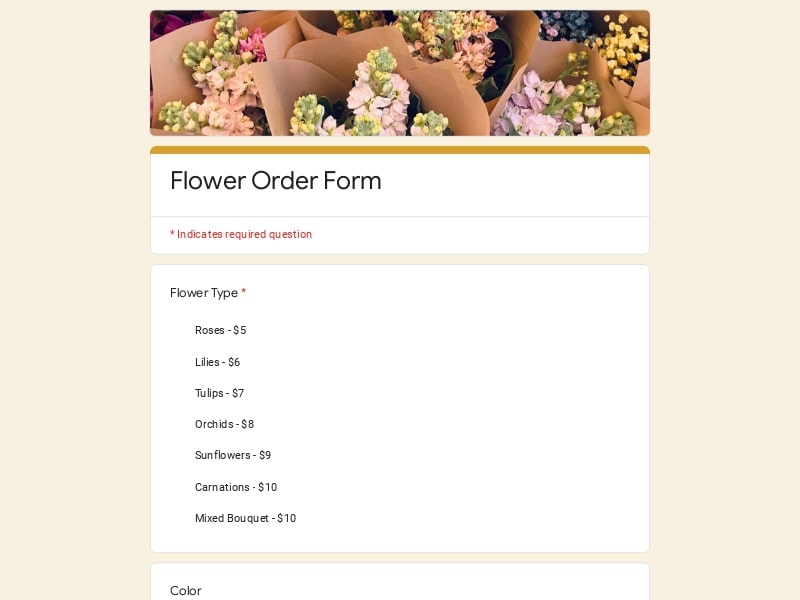
A florist order form is a structured document used by a floral shop or flower shop to collect customer requests for flower bouquet purchases, event flowers, funeral flower delivery, wedding arrangements, subscriptions, and custom floral design services. In Google Forms, these templates work as editable online forms that customers can complete from any device while responses are automatically organized for processing and delivery coordination.
Florists commonly use these forms to accept orders online, reduce back-and-forth communication, manage delivery schedules, collect recipient information, confirm floral arrangement preferences, and centralize customer requests in one workflow. Many businesses also export submissions into Excel, Google Sheet, or PDF files for accounting, fulfillment, staff coordination, or event planning.
A florist order form should help collect everything needed to process bouquet requests, coordinate delivery, manage event logistics, and reduce manual follow-ups. In Google Forms, a well-structured setup also improves order management by organizing responses automatically inside Google Sheets, making it easier for a floral shop to track customer requests, fulfillment status, and delivery schedules.
| Section | What to Include | Example Questions |
|---|---|---|
| Customer Contact Details | Collect the information needed for confirmations, delivery coordination, substitutions, and customer communication. This section should make it easy for the florist team to contact the buyer quickly if there are inventory changes or timing issues. | - What is your full name? - What phone number should we use for order updates? - What email address should receive the confirmation? - What is your preferred contact method? |
| Flower Bouquet Selection | Allow customers to select bouquet types, arrangement styles, flower categories, and quantity preferences. This section is especially important for flower shop workflows with both standard and custom floral arrangement options. | - Which flower bouquet would you like to order? - What bouquet size do you prefer? - How many arrangements do you need? - Would you like a pre-designed or custom floral arrangement? |
| Occasion & Event Information | Gather details about the purpose of the order so the florist can tailor the floral design, packaging, messaging, and presentation style. Different occasions often require completely different workflows and preparation timelines. | - Is this order for a wedding, funeral flower service, birthday, or corporate event? - What is the date of the event? - What atmosphere or floral style are you looking for? - Are there venue restrictions or setup requirements? |
| Delivery Coordination | This section should capture all logistics required for accurate delivery. For florist businesses offering same-day or scheduled delivery, collecting precise timing and recipient instructions is critical. | - What is the delivery address? - What delivery date and time window do you prefer? - Should the driver call before arrival? - Is there gate access, parking, or entry information we should know? |
| Recipient Details | Separate recipient information from buyer information to avoid confusion during fulfillment. This is especially useful for surprise deliveries, sympathy arrangements, and corporate gifting. | - Who will receive the flowers? - What is the recipient’s phone number? - Should the delivery remain a surprise? - What relationship do you have with the recipient? |
| Customization & Floral Design Requests | Give customers room to request specific flowers, colors, arrangement styles, wrapping preferences, or inspiration references. This section supports custom florist workflows and premium floral shop services. | - Are there specific flowers you would like included? - Are there flowers or colors to avoid? - Do you have inspiration photos for the arrangement? - What floral design style do you prefer? |
| Wedding Flower Planning | Wedding-focused florist order forms should collect ceremony details, bridal party needs, venue schedules, and setup requirements. These forms often support large multi-item orders and extended planning workflows. | - Which wedding arrangements are needed? - Do you need bouquets, centerpieces, ceremony flowers, or arches? - What is the wedding venue location? - Who is the main wedding coordinator contact? |
| Funeral Flower Requests | Funeral flower forms should simplify sensitive and time-critical requests. The form should help customers provide service timing, memorial details, and sympathy card instructions clearly. | - What is the name of the memorial service location? - When should the arrangement arrive? - What message should appear on the sympathy card? - Would you like standing sprays, wreaths, or bouquet arrangements? |
| Bulk Flower Orders & Corporate Requests | Large event and recurring business orders require additional operational details like installation timing, recurring schedules, and invoice preferences. This section is useful for hotels, restaurants, and event planners. | - Is this a bulk flower order? - How many tables or arrangements are required? - Do you need recurring weekly or monthly delivery? - Should invoices be sent to a company contact? |
| Budget & Pricing Preferences | Some customers care more about arrangement size while others prioritize a specific budget. Capturing this early helps florists suggest realistic floral arrangement options and avoid pricing misunderstandings. | - What is your estimated budget? - Would you like premium flower substitutions if needed? - Do you want a price quote before confirmation? - Are you flexible with flower availability? |
| Payment & Order Approval | Include confirmation fields that support fulfillment workflows, approvals, and order processing. Google Forms can also integrate with payment workflows through links or connected systems. | - Which payment method will you use? - Have you reviewed the delivery details? - Do you approve substitutions if flowers are unavailable? - Would you like a final order summary before fulfillment? |
Different florist businesses need different workflows depending on the type of customers they serve, the complexity of the floral arrangement process, and how orders are fulfilled. A flower order form for a local bouquet shop usually looks very different from a wedding consultation workflow or a large-scale event florist intake form.
These forms are designed for daily flower shop operations and fast order online workflows. They usually focus on bouquet selection, recipient details, delivery timing, and add-ons like greeting cards or chocolates. This type of florist order form works best for local floral shops handling birthdays, anniversaries, thank-you flowers, and same-day delivery requests.
They are especially useful for:
Wedding forms support more complex planning workflows that involve multiple floral arrangements, venue coordination, bridal party flowers, setup schedules, and ongoing communication. These templates usually collect detailed aesthetic preferences, mood references, ceremony timing, and installation requirements.
They work well for:
Funeral flower forms help simplify urgent and emotionally sensitive requests. These forms focus on memorial service timing, sympathy arrangements, delivery coordination with funeral homes, and custom card messaging.
This type of form is helpful for:
Corporate and event florist workflows often involve recurring schedules, multiple delivery locations, branded floral arrangements, and invoice-based billing. These forms help simplify communication between the floral shop, event planners, hotels, restaurants, and corporate clients.
Common use cases include:
Bulk flower order templates are designed for customers purchasing flowers in larger quantities rather than finished bouquets. These forms often include stem counts, flower varieties, packaging preferences, pickup scheduling, and wholesale pricing requests.
They are commonly used by:
Some florist businesses focus heavily on personalized floral design instead of standard catalog ordering. These forms help customers describe creative direction, upload inspiration photos, explain styling preferences, and request unique arrangements.
This workflow is valuable for:
Subscription forms help automate recurring flower delivery services for homes, offices, hotels, restaurants, and retail businesses. Instead of repeating the same process every week, customers submit preferences once and manage recurring schedules through the form workflow.
Best suited for:
Google Forms gives florist businesses a flexible and low-maintenance way to manage flower orders, delivery requests, consultations, and customer communication without needing expensive custom software. Because responses automatically connect to Google Sheets, florist teams can organize workflows, export data, and manage fulfillment more efficiently across both small flower shops and larger floral studios.
Customers can place flower bouquet requests, wedding inquiries, funeral flower orders, and delivery requests online without calling the shop. This reduces manual communication and speeds up order intake during busy periods.
Every florist order submission is automatically stored inside Google Sheets, making it easier to manage delivery schedules, track order status, organize customer data, and support daily order management workflows.
Florists can quickly update pricing, flower availability, holiday collections, wedding packages, and floral arrangement options without rebuilding the entire form. This is especially useful during Valentine’s Day, Mother’s Day, and wedding season.
Google Forms makes it simple to collect recipient information, delivery timing, address notes, and setup instructions in a structured format that reduces fulfillment mistakes.
The same editable system can be adapted for bouquet order forms, wedding consultations, bulk flower order requests, event planning, subscription services, or custom floral design projects.
Flower shops can share forms through websites, Instagram bios, Facebook pages, email campaigns, or QR codes in-store, making it easier for customers to order online from any device.
Many small floral shop businesses do not need complex ecommerce systems. Google Forms provides a lightweight alternative for collecting and managing customer requests professionally.
Responses can be exported into Excel, Google Sheet, CSV, or PDF formats for accounting, reporting, event coordination, or fulfillment tracking. This helps florist teams maintain organized records without additional software.
Centralized responses make it easier to review upcoming deliveries, wedding projects, event schedules, recurring subscriptions, and pending approvals in one place instead of scattered emails or handwritten notes.
Choose your platform and follow the steps to get your flower order form live in minutes.
Install Google Forms from the App Store. You'll need iOS 16 or later.
Open the app and sign in with your Google account. This is required to save and share forms.
Tap the template in the list.
Edit any question, add your flavor options, update the design theme and colors — all from within the app.
Tap the Share button (top right). Choose how to distribute your form:
The template is instantly copied to your Google Drive — no manual setup needed. You must be signed in to your Google account for this to work.
Auto-copied to Google DriveEdit question text, add your actual flavor options, adjust dropdowns, and personalize the form to your bakery.
Toggle "Required" on essential fields — name, email, order date, and quantity — so no key detail is missed.
Use Google Forms' built-in sharing to distribute your form via URL, embed it on a site, or generate a printable QR code.
Responses appear in real time in the Responses tab, or link to Google Sheets for a full sortable order spreadsheet.
Make sure you're signed in to Google before clicking the button. The form opens directly in Google Forms in your browser — no app download needed.
Choose a ready-made template for your needs and customize it in just a few minutes.

Scan to use Google Forms on iPhone or iPad!