Planning a summer camp is easier when registration details, medical information, permissions, and emergency contacts are collected in one Google Forms workflow. This template gives organizers a ready-to-use structure that can be customized for day camps, overnight programs, school activities, church groups, fitness camps, dance camps, and other seasonal events.
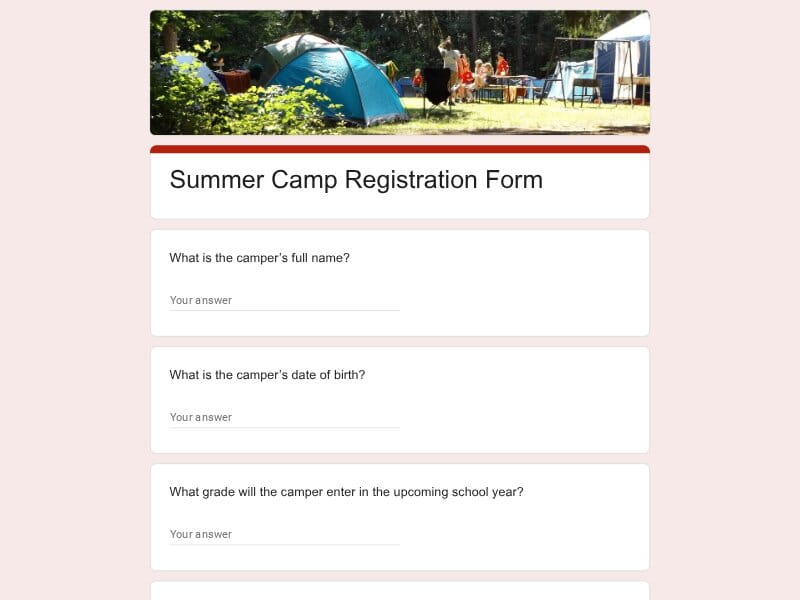
Use this editable Google Forms template as a practical starting point for collecting camper information, parent contacts, health details, activity preferences, and required permissions while automatically organizing responses for review and follow-up.
A Summer Camp Registration Form is a structured enrollment document used to gather participant information before a summer program begins. It helps organizers collect registration details, contact information, health records, permissions, schedules, and other data needed to manage camp operations safely and efficiently.
Whether the camp focuses on outdoor camping, sports, arts, academics, dance, fitness, church activities, STEM education, or virtual summer programs, a well-designed form creates a consistent registration process for every family. It also reduces administrative work by centralizing information and storing responses automatically in Google Forms, with options to export data to Excel, Google Sheet, PDF, and other reporting workflows when needed.
A summer camp registration form should collect more than basic enrollment details. Camp organizers need information that supports scheduling, safety, communication, supervision, transportation, and program planning. A well-designed Google Forms template helps gather complete information from parents while keeping the registration process simple and organized.
| Section | What to Include | Example Questions |
|---|---|---|
| Camper Information | Basic participant details used to identify the camper, assign groups, verify eligibility, and manage attendance throughout the summer program. |
What is the camper's full name? What is the camper's date of birth? What grade will the camper enter next school year? Has the camper attended this camp before? |
| Parent & Guardian Details | Primary family contact information used for registration confirmation, updates, schedule changes, and urgent communication. |
Who is the primary parent or guardian? What is the best phone number to reach you during camp hours? What email address should receive camp updates? Is there a secondary guardian who should receive communications? |
| Camp Session Selection | Enrollment choices covering camp dates, attendance periods, program tracks, and optional add-on services. |
Which summer camp session would you like to register for? Which weeks will the camper attend? Will the camper participate full-time or part-time? Would you like before-care or after-care services? |
| Emergency Contacts | Backup contacts who can be reached if parents or guardians are unavailable during an emergency. |
Who should be contacted if a parent cannot be reached? What is their phone number? What is their relationship to the camper? May this person pick up the camper if needed? |
| Medical & Health Information | Important health details that help staff respond appropriately to medical needs and provide a safe camp experience. |
Does the camper have allergies? Does the camper have any medical conditions staff should know about? Will medication need to be administered during camp hours? Are there dietary restrictions or food sensitivities? |
| Authorized Pickup List | Individuals approved to pick up the camper at the end of the day and any pickup restrictions that staff should follow. |
Who is authorized to pick up the camper? Are there individuals who may not pick up the camper? What phone numbers should staff use to verify pickup arrangements? Will identification be required during pickup? |
| Activities & Interests | Participant preferences used for planning groups, activities, and special programs during the summer session. |
Which camp activities interest your child most? Does the camper prefer sports, arts, fitness, dance, STEM, or outdoor camping activities? What hobbies or interests should counselors know about? Are there activities the camper would prefer to avoid? |
| Experience & Skill Level | Background information that helps staff place participants in age-appropriate and skill-appropriate groups. |
Has the camper attended similar programs before? Does the camper have experience with outdoor activities? What skill level best describes the participant? Are there areas where additional support may be helpful? |
| Transportation Arrangements | Arrival and departure logistics that help organizers manage daily attendance and supervision. |
How will the camper arrive each day? How will the camper return home? Will transportation needs vary during the session? Are there special transportation instructions staff should follow? |
| Permissions & Consent | Required acknowledgments and approvals covering participation, safety policies, photographs, and emergency procedures. |
Do you approve participation in all camp activities? Do you consent to emergency medical treatment if necessary? Do you allow photos or videos to be used for camp communications? Do you agree to camp policies and participant expectations? |
| Behavioral & Support Considerations | Information that helps counselors create a positive environment and provide appropriate accommodations when needed. |
Are there behavioral considerations staff should understand? Does the camper have learning or developmental accommodations? What strategies help your child succeed in group settings? Are there triggers or concerns camp staff should be aware of? |
| Communication Preferences | Parent preferences for receiving announcements, reminders, schedules, and camp-related updates. |
How would you prefer to receive updates? Should notifications be sent to multiple guardians? Would you like reminders before the session begins? Would you like emergency alerts by phone, email, or both? |
| Additional Information | Open-ended details that may not fit standard registration fields but could help improve the camper experience. |
Is there anything else camp staff should know? What are your goals for your child's summer camp experience? Are there concerns you would like discussed before camp begins? Do you have additional comments or requests? |
Although designed as a summer camp registration form, this template can support a wide range of youth programs, seasonal activities, educational events, and community initiatives. Different organizers can customize the form to match their enrollment process while keeping registration information consistent and easy to manage in Google Forms.
Traditional day camps, overnight camps, specialty camps, and outdoor camping programs can use the template to collect participant details, health information, activity preferences, permissions, and emergency contacts before the season begins.
Schools often run summer learning initiatives, enrichment programs, STEM camps, academic workshops, language programs, and student activities that require structured registration and parent communication.
Sports academies, youth leagues, fitness camps, conditioning programs, and athletic development events can use the form to gather participant experience, medical information, attendance preferences, and emergency contacts.
Dance schools, theater groups, music workshops, art camps, and creative education programs can collect enrollment information, experience levels, scheduling preferences, and participant interests through a single registration process.
Church camps, youth ministries, seasonal retreats, Vacation Bible School programs, and community outreach events often need parent permissions, health information, transportation details, and emergency records.
Community recreation programs, youth development initiatives, mentoring programs, and nonprofit-sponsored summer activities can streamline participant enrollment and maintain organized records.
Organizations focused on hiking, environmental education, wilderness skills, outdoor leadership, and camping experiences can gather safety information and participant readiness details before activities begin.
Online camps, virtual workshops, remote learning programs, and hybrid events can use the same registration structure to collect participant information, communication preferences, and program selections.
Coding camps, robotics camps, leadership camps, entrepreneurship programs, science camps, gaming camps, and other niche programs can customize the template around their specific enrollment requirements.
Managing camp enrollment often involves collecting information from dozens or even hundreds of families. Google Forms simplifies the registration process by making forms easy to distribute, customize, review, and maintain while automatically organizing submissions in one place.
Parents can submit registration information from any device without installing software or creating additional accounts. This reduces friction and helps increase completed registrations.
Organizers can customize questions, update schedules, add consent sections, modify activity selections, and adapt the design for sports, dance, fitness, church, academic, outdoor, or virtual programs.
Every submission is stored in a structured format, helping staff review registrations, verify requirements, track attendance, and manage participant records more efficiently.
Responses can be connected directly to Google Sheets for reporting, filtering, participant tracking, waitlists, roster management, and operational planning throughout the summer season.
Registration data can be reviewed online or exported for use in Excel, Google Sheet, PDF reports, attendance documents, and administrative records when needed.
Instead of processing paper forms, staff can collect information digitally, minimize manual data entry, reduce errors, and spend more time preparing the camp experience.
Accurate parent contact information helps organizers distribute updates, reminders, schedules, policy changes, and important announcements before and during camp sessions.
Once customized, the same editable template can be reused as a sample registration system for future summer programs, reducing setup time from year to year.
Whether registering a small local camp or managing hundreds of campers across multiple sessions, Google Forms provides a practical way to collect and organize information consistently.
Choose your platform and follow the steps to get your summer camp registration form live in minutes.
Install Google Forms from the App Store. You'll need iOS 16 or later.
Open the app and sign in with your Google account. This is required to save and share forms.
Tap the template in the list.
Edit any question, add your flavor options, update the design theme and colors — all from within the app.
Tap the Share button (top right). Choose how to distribute your form:
The template is instantly copied to your Google Drive — no manual setup needed. You must be signed in to your Google account for this to work.
Auto-copied to Google DriveEdit question text, add your actual flavor options, adjust dropdowns, and personalize the form to your bakery.
Toggle "Required" on essential fields — name, email, order date, and quantity — so no key detail is missed.
Use Google Forms' built-in sharing to distribute your form via URL, embed it on a site, or generate a printable QR code.
Responses appear in real time in the Responses tab, or link to Google Sheets for a full sortable order spreadsheet.
Make sure you're signed in to Google before clicking the button. The form opens directly in Google Forms in your browser — no app download needed.
Choose a ready-made template for your needs and customize it in just a few minutes.

Scan to use Google Forms on iPhone or iPad!