Designed for churches, pastors, and ministry teams who want to grow through honest feedback. Copy this template into Google Forms, share the link after service, and use real responses to sharpen your preaching and strengthen your ministry.
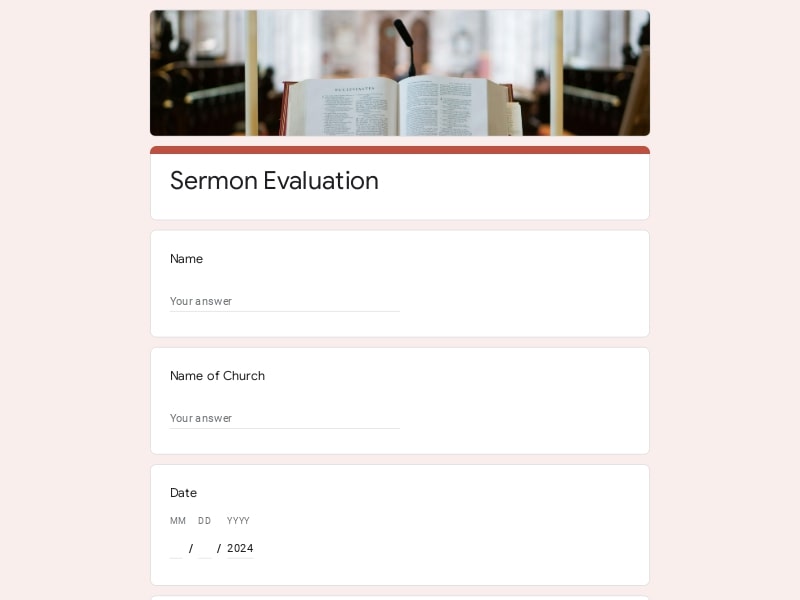
A ready-to-use Google Forms template for collecting structured sermon feedback from your congregation.
A well-structured sermon evaluation form covers the key criteria your congregation uses — consciously or not — to assess a message. The table below outlines each evaluation section, what to look for, and example questions you can copy directly into Google Forms.
| Section | What to include | Example questions |
|---|---|---|
| Basic information | Service date, sermon topic, and whether the respondent wants to stay anonymous | What is the date of this sermon? / Would you like to remain anonymous? |
| Message clarity | Evaluation criteria for how clearly the main point was communicated and whether it was easy to follow | How clear was the main message? / Was the sermon easy to understand from start to finish? |
| Relevance | Whether the topic connected to everyday life and felt timely for the congregation | How relevant was this topic to your personal life? / Did the message feel timely? |
| Delivery & speaker | Evaluation criteria for pace, tone, engagement, and overall communication effectiveness | How engaging was the speaker? / Was the pace of the sermon appropriate? |
| Spiritual impact | Whether the sermon prompted reflection, inspired action, or deepened faith | Did this sermon inspire you to reflect or act? / Did the message deepen your understanding of scripture? |
| Structure & length | Evaluation criteria for logical flow, clear introduction and conclusion, and appropriate duration | Was the sermon length appropriate? / Did it have a clear structure? |
| Engagement | Use of stories, illustrations, and examples that held attention throughout | Did you feel engaged throughout? / Were the examples or stories helpful? |
| Open feedback | Space for personal takeaways, suggestions, and any additional comments | What was your main takeaway? / What could be improved in future sermons? |
This sermon evaluation template is built for anyone involved in planning, delivering, or improving church services. Whether you lead a congregation of 20 or 2,000, this form gives you a simple, structured way to gather the feedback that matters.
Get direct feedback on your sermons to understand what resonates, what needs clarity, and how to grow as a communicator week after week.
From small congregations to large multi-service churches — collect consistent, structured feedback after every service without any extra tools.
Use evaluation data to support your pastoral team, identify training opportunities, and make informed decisions about your ministry's direction.
Coordinate feedback collection across multiple services or campuses and keep all responses organized in one shared Google Sheet.
Gather audience impressions after a one-time message and take concrete, actionable insights to your next speaking engagement.
Adapt the form for small group sessions or Bible studies to evaluate discussion quality, topic relevance, and participant engagement.
Choose your platform and follow the steps to get your sermon evaluation form live in minutes.
Install Google Forms from the App Store. You'll need iOS 16 or later.
Open the app and sign in with your Google account. This is required to save and share forms.
Tap the template in the list.
Edit any question, add your flavor options, update the design theme and colors — all from within the app.
Tap the Share button (top right). Choose how to distribute your form:
The template is instantly copied to your Google Drive — no manual setup needed. You must be signed in to your Google account for this to work.
Auto-copied to Google DriveEdit question text, add your actual flavor options, adjust dropdowns, and personalize the form to your bakery.
Toggle "Required" on essential fields — name, email, order date, and quantity — so no key detail is missed.
Use Google Forms' built-in sharing to distribute your form via URL, embed it on a site, or generate a printable QR code.
Responses appear in real time in the Responses tab, or link to Google Sheets for a full sortable order spreadsheet.
Make sure you're signed in to Google before clicking the button. The form opens directly in Google Forms in your browser — no app download needed.
Choose a ready-made template for your needs and customize it in just a few minutes.

Scan to use Google Forms on iPhone or iPad!